
NIST Standards
- SP 800-53 Rev 4 — Security and Privacy Controls for Federal Information Systems and Organizations
- SP 800-190 – -Application Container Security Guide
- SP 500-291 –NIST Cloud Computing Standards Roadmap
- SP 800-39 –Managing Information Security Risk. Organization, Mission, and Information System View
- NIST Cyber Security Framework 1.1
ref:
https://doi.org/10.6028/NIST.SP.800-53r4
https://doi.org/10.6028/NIST.SP.800-190
https://www.nist.gov/nist-pub-series/special-publication-nist-sp
https://doi.org/10.6028/NIST.CSWP.04162018
https://doi.org/10.6028/NIST.SP.800-39
Click to access nistspecialpublication800-39.pdf
Terraform
Health and Foods
Broccoli:

Celery:

Carrot:

Beets:

Bananas:

- Bananas are rich in potassium and fiber.
- They may help prevent asthma, cancer, high blood pressure, diabetes, cardiovascular disease, and digestive problems.
- Ripen bananas at room temperature and add them to cereal for a tasty breakfast.
- People who use beta blockers should not suddenly increase their intake of bananas.
Avocado:


Android:
Android:
Initial release date: Sep 23, 2008 and written in Java and C++
Initially, Andy Rubin founded Android Incorporation in Palo Alto, California, United States in October, 2003
Kotlin support exactly the same Android APIs (and bytecode), while others such as Go have restricted API access.
- Android Virtual Device (AVD)
- Dalvik Virtual Machine | DVM
- Android Studio:

Dalvik Virtual Machine | DVM
As we know the modern JVM is high performance and provides excellent memory management. But it needs to be optimized for low-powered handheld devices as well.
The Dalvik Virtual Machine (DVM) is an android virtual machine optimized for mobile devices. It optimizes the virtual machine for memory, battery life and performance.
Dalvik is a name of a town in Iceland. The Dalvik VM was written by Dan Bornstein.
The Dex compiler converts the class files into the .dex file that run on the Dalvik VM. Multiple class files are converted into one dex file.
Let’s see the compiling and packaging process from the source file:
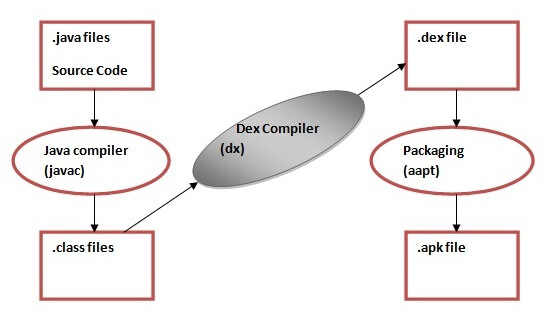
The javac tool compiles the java source file into the class file.
The dx tool takes all the class files of your application and generates a single .dex file. It is a platform-specific tool.
The Android Assets Packaging Tool (aapt) handles the packaging process.


Sources:
https://en.wikipedia.org/wiki/Android_version_history
RHEL:RHCSA:7
RHCSA:EX200
- Study points for the exam
- Red Hat reserves the right to add, modify, and remove objectives. Such changes will be made public in advance through revisions to this document.
- RHCSA exam candidates should be able to accomplish the tasks below without assistance. These have been grouped into several categories.
- Understand and use essential tools
-
- Access a shell prompt and issue commands with correct syntax
- Use input-output redirection (>, >>, |, 2>, etc.)
- Use grep and regular expressions to analyze text
- Access remote systems using ssh
- Log in and switch users in multiuser targets
- Archive, compress, unpack, and uncompress files using tar, star, gzip, and bzip2
- Create and edit text files
- Create, delete, copy, and move files and directories
- Create hard and soft links
- List, set, and change standard ugo/rwx permissions
- Locate, read, and use system documentation including man, info, and files in /usr/share/doc
Note: Red Hat may use applications during the exam that are not included in Red Hat Enterprise Linux for the purpose of evaluating candidate’s abilities to meet this objective.
- Operate running systems
-
- Boot, reboot, and shut down a system normally
- Boot systems into different targets manually
- Interrupt the boot process in order to gain access to a system
- Identify CPU/memory intensive processes, adjust process priority with renice, and kill processes
- Locate and interpret system log files and journals
- Access a virtual machine’s console
- Start and stop virtual machines
- Start, stop, and check the status of network services
- Securely transfer files between systems
- Configure local storage
-
- List, create, delete partitions on MBR and GPT disks
- Create and remove physical volumes, assign physical volumes to volume groups, and create and delete logical volumes
- Configure systems to mount file systems at boot by Universally Unique ID (UUID) or label
- Add new partitions and logical volumes, and swap to a system non-destructively
- Create and configure file systems
-
- Create, mount, unmount, and use vfat, ext4, and xfs file systems
- Mount and unmount CIFS and NFS network file systems
- Extend existing logical volumes
- Create and configure set-GID directories for collaboration
- Create and manage Access Control Lists (ACLs)
- Diagnose and correct file permission problems
- Deploy, configure, and maintain systems
-
- Configure networking and hostname resolution statically or dynamically
- Schedule tasks using at and cron
- Start and stop services and configure services to start automatically at boot
- Configure systems to boot into a specific target automatically
- Install Red Hat Enterprise Linux systems as virtual guests
- Configure systems to launch virtual machines at boot
- Configure network services to start automatically at boot
- Configure a system to use time services
- Install and update software packages from Red Hat Network, a remote repository, or from the local file system
- Update the kernel package appropriately to ensure a bootable system
- Modify the system bootloader
- Manage users and groups
-
- Create, delete, and modify local user accounts
- Change passwords and adjust password aging for local user accounts
- Create, delete, and modify local groups and group memberships
- Configure a system to use an existing authentication service for user and group information
- Manage security
-
- Configure firewall settings using firewall-config, firewall-cmd, or iptables
- Configure key-based authentication for SSH
- Set enforcing and permissive modes for SELinux
- List and identify SELinux file and process context
- Restore default file contexts
- Use boolean settings to modify system SELinux settings
- Diagnose and address routine SELinux policy violations
Red Hat Certified Engineer exam (EX300)
System configuration and management
- Use network teaming or bonding to configure aggregated network links between two Red Hat Enterprise Linux systems
- Configure IPv6 addresses and perform basic IPv6 troubleshooting
- Route IP traffic and create static routes
- Use firewalld and associated mechanisms such as rich rules, zones and custom rules, to implement packet filtering and configure network address translation (NAT)
- Configure a system to authenticate using Kerberos
- Configure a system as either an iSCSI target or initiator that persistently mounts an iSCSI target
- Produce and deliver reports on system utilization (processor, memory, disk, and network)
- Use shell scripting to automate system maintenance tasks
Network services
Network services are an important subset of the exam objectives. RHCE candidates should be capable of meeting the following objectives for each of the network services listed below:
- Install the packages needed to provide the service
- Configure SELinux to support the service
- Use SELinux port labeling to allow services to use non-standard ports
- Configure the service to start when the system is booted
- Configure the service for basic operation
- Configure host-based and user-based security for the service
HTTP/HTTPS
- Configure a virtual host
- Configure access restrictions on directories
- Deploy a basic CGI application
- Configure group-managed content
- Configure TLS security
DNS
- Configure a caching-only name server
- Troubleshoot DNS client issues
NFS
- Provide network shares to specific clients
- Provide network shares suitable for group collaboration
- Use Kerberos to control access to NFS network shares
SMB
- Provide network shares to specific clients
- Provide network shares suitable for group collaboration
SMTP
- Configure a system to forward all email to a central mail server
SSH
- Configure key-based authentication
- Configure additional options described in documentation
NTP
- Synchronize time using other NTP peers
Database services
- Install and configure MariaDB
- Backup and restore a database
- Create a simple database schema
- Perform simple SQL queries against a database
https://www.redhat.com/en/services/training/ex200-red-hat-certified-system-administrator-rhcsa-exam
Splunk Enterprise: 7.0.0
Splunk Enterprise 7.0.0 (clustered in AWS)##
Service name :splunkd
/opt/splunk/bin
./splunk start —accept-license
index = “main”
web port :8000 admin/changeme
./splunk enable listen 9997
###Splunkforwarder -7.0.0### — mgmt port:8089
/opt/splunkforwarder/bin
./splunk start —accept-license
./splunk add forward-server 192.168.0.254:9997 —
./splunk add monitor /var/log/syslog -index main —sourcetype MyUFServerLogs
Q:
- configure master node
- add index node to master
- deployment server config
Search subnet : head search
Index subnet :
Universal forwarder:
Alternates:
ArcSight or QRadar
ELK, SumoLogic


If you want to implement Splunk in your infrastructure, then it is important that you know how Splunk works internally. I have written this blog to help you understand the Splunk architecture and tell you how different Splunk components interact with one another.
In case you want more clarity on what is Splunk, then I recommend you to read this blog of mine, which will give you an understanding of Splunk and tell you why it is a necessity for companies having a huge infrastructure.
Before I talk about how different Splunk components function, let me mention the various stages of data pipeline each component falls under.
Different Stages In Data Pipeline
There are primarily 3 different stages in Splunk:
- Data Input stage
- Data Storage stage
- Data Searching stage

Data Input Stage
In this stage, Splunk software consumes the raw data stream from its source, breaks it into 64K blocks, and annotates each block with metadata keys. The metadata keys include hostname, source, and source type of the data. The keys can also include values that are used internally, such as character encoding of the data stream and values that control the processing of data during the indexing stage, such as the index into which the events should be stored.
Data Storage Stage
Data storage consists of two phases: Parsing and Indexing.
- In Parsing phase, Splunk software examines, analyzes, and transforms the data to extract only the relevant information. This is also known as event processing. It is during this phase that Splunk software breaks the data stream into individual events. The parsing phase has many sub-phases:
- Breaking the stream of data into individual lines
- Identifying, parsing, and setting timestamps
- Annotating individual events with metadata copied from the source-wide keys
- Transforming event data and metadata according to regex transform rules
- In Indexing phase, Splunk software writes parsed events to the index on disk. It writes both compressed raw data and the corresponding index file. The benefit of Indexing is that the data can be easily accessed during searching.
Data Searching Stage
This stage controls how the user accesses, views, and uses the indexed data. As part of the search function, Splunk software stores user-created knowledge objects, such as reports, event types, dashboards, alerts and field extractions. The search function also manages the search process.
Splunk Components
If you look at the below image, you will understand the different data pipeline stages under which various Splunk components fall under.

There are 3 main components in Splunk:
- Splunk Forwarder, used for data forwarding
- Splunk Indexer, used for Parsing and Indexing the data
- Search Head, is a GUI used for searching, analyzing and reporting
Splunk Forwarder
Splunk Forwarder is the component which you have to use for collecting the logs. Suppose, you want to collect logs from a remote machine, then you can accomplish that by using Splunk’s remote forwarders which are independent of the main Splunk instance.
In fact, you can install several such forwarders in multiple machines, which will forward the log data to a Splunk Indexer for processing and storage. What if you want to do real-time analysis of the data? Splunk forwarders can be used for that purpose too. You can configure the forwarders to send data to Splunk indexers in real-time. You can install them in multiple systems and collect the data simultaneously from different machines in real time.
To understand how real time forwarding of data happens, you can read my blog on how Domino’s is using Splunk to gain operational efficiency.
Compared to other traditional monitoring tools, Splunk Forwarder consumes very less cpu ~1-2%. You can scale them up to tens of thousands of remote systems easily, and collect terabytes of data with minimal impact on performance.
Now, let us understand the different types of Splunk forwarders.

Universal Forwarder – You can opt for an universal forwarder if you want to forward the raw data collected at the source. It is a simple component which performs minimal processing on the incoming data streams before forwarding them to an indexer.
Data transfer is a major problem with almost every tool in the market. Since there is minimal processing on the data before it is forwarded, lot of unnecessary data is also forwarded to the indexer resulting in performance overheads.
Why go through the trouble of transferring all the data to the Indexers and then filter out only the relevant data? Wouldn’t it be better to only send the relevant data to the Indexer and save on bandwidth, time and money? This can be solved by using Heavy forwarders which I have explained below.

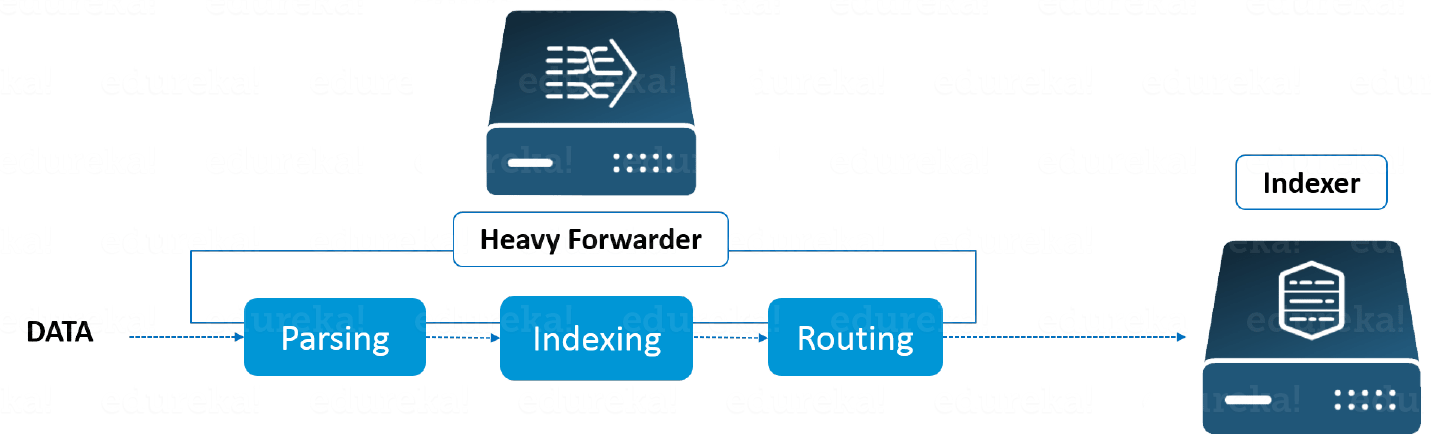
Heavy Forwarder – You can use a Heavy forwarder and eliminate half your problems, because one level of data processing happens at the source itself before forwarding data to the indexer. Heavy Forwarder typically does parsing and indexing at the source and also intelligently routes the data to the Indexer saving on bandwidth and storage space. So when a heavy forwarder parses the data, the indexer only needs to handle the indexing segment.
Splunk Indexer

Indexer is the Splunk component which you will have to use for indexing and storing the data coming from the forwarder. Splunk instance transforms the incoming data into events and stores it in indexes for performing search operations efficiently. If you are receiving the data from a Universal forwarder, then the indexer will first parse the data and then index it. Parsing of data is done to eliminate the unwanted data. But, if you are receiving the data from a Heavy forwarder, the indexer will only index the data.
As the Splunk instance indexes your data, it creates a number of files. These files contain one of the below:
- Raw data in compressed form
- Indexes that point to raw data (index files, also referred to as tsidx files), plus some metadata files
These files reside in sets of directories called buckets.
Let me now tell you how Indexing works.
Splunk processes the incoming data to enable fast search and analysis. It enhances the data in various ways like:
- Separating the data stream into individual, searchable events
- Creating or identifying timestamps
- Extracting fields such as host, source, and sourcetype
- Performing user-defined actions on the incoming data, such as identifying custom fields, masking sensitive data, writing new or modified keys, applying breaking rules for multi-line events, filtering unwanted events, and routing events to specified indexes or servers
This indexing process is also known as event processing.
Another benefit with Splunk Indexer is data replication. You need not worry about loss of data because Splunk keeps multiple copies of indexed data. This process is called Index replication or Indexer clustering. This is achieved with the help of an Indexer cluster, which is a group of indexers configured to replicate each other’s’ data.
Splunk Search Head

Search head is the component used for interacting with Splunk. It provides a graphical user interface to users for performing various operations. You can search and query the data stored in the Indexer by entering search words and you will get the expected result.
You can install the search head on separate servers or with other Splunk components on the same server. There is no separate installation file for search head, you just have to enable splunkweb service on the Splunk server to enable it.
A Splunk instance can function both as a search head and a search peer. A search head that performs only searching, and not indexing is referred to as a dedicated search head. Whereas, a search peer performs indexing and responds to search requests from other search heads.
In a Splunk instance, a search head can send search requests to a group of indexers, or search peers, which perform the actual searches on their indexes. The search head then merges the results and sends them back to the user. This is a faster technique to search data called distributed searching.
Search head clusters are groups of search heads that coordinate the search activities. The cluster coordinates the activity of the search heads, allocates jobs based on the current loads, and ensures that all the search heads have access to the same set of knowledge objects.
Advanced Splunk Architecture With A Deployment Server / Management Console Host
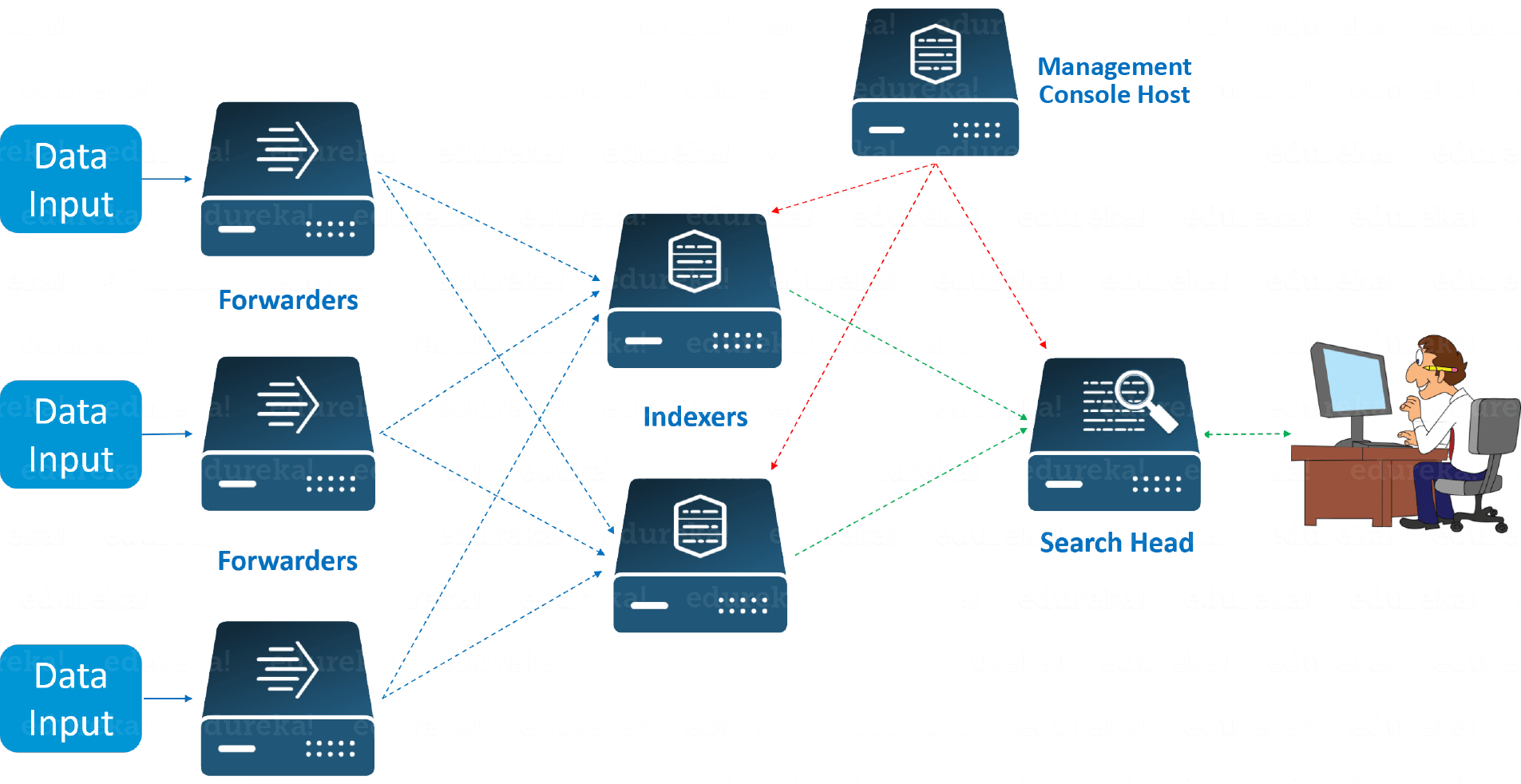
Look at the above image to understand the end to end working of Splunk. The images shows a few remote Forwarders that send the data to the Indexers. Based on the data present in the Indexer, you can use the Search Head to perform functions like searching, analyzing, visualizing and creating knowledge objects for Operational Intelligence.
The Management Console Host acts as a centralized configuration manager responsible for distributing configurations, app updates and content updates to the Deployment Clients. The Deployment Clients are Forwarders, Indexers and Search Heads.
Splunk Architecture
If you have understood the concepts explained above, you can easily relate to the Splunk architecture. Look at the image below to get a consolidated view of the various components involved in the process and their functionalities.
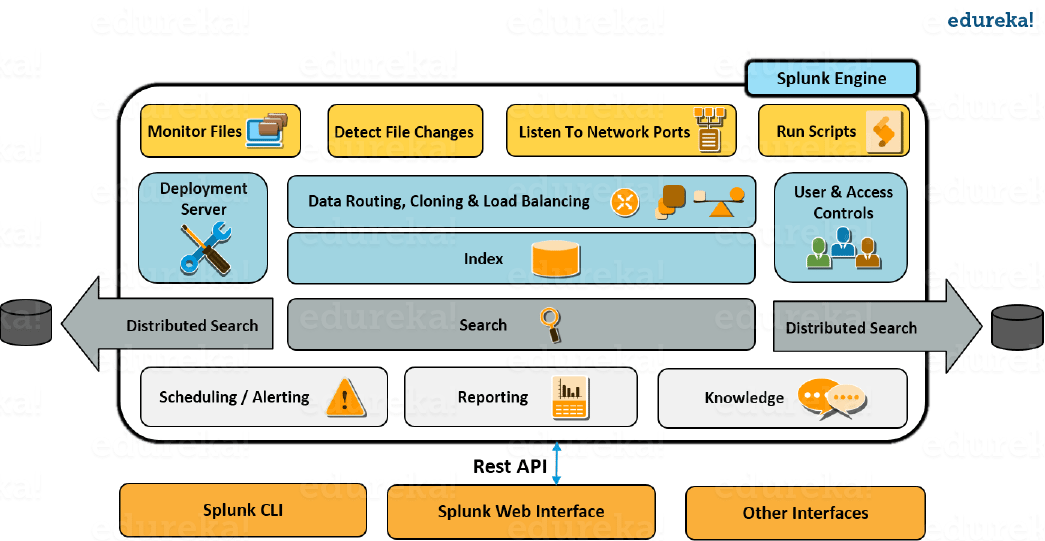
- You can receive data from various network ports by running scripts for automating data forwarding
- You can monitor the files coming in and detect the changes in real time
- The forwarder has the capability to intelligently route the data, clone the data and do load balancing on that data before it reaches the indexer. Cloning is done to create multiple copies of an event right at the data source where as load balancing is done so that even if one instance fails, the data can be forwarded to another instance which is hosting the indexer
- As I mentioned earlier, the deployment server is used for managing the entire deployment, configurations and policies
- When this data is received, it is stored in an Indexer. The indexer is then broken down into different logical data stores and at each data store you can set permissions which will control what each user views, accesses and uses
- Once the data is in, you can search the indexed data and also distribute searches to other search peers and the results will merged and sent back to the Search head
- Apart from that, you can also do scheduled searches and create alerts, which will be triggered when certain conditions match saved searches
- You can use saved searches to create reports and make analysis by using Visualization dashboards
- Finally you can use Knowledge objects to enrich the existing unstructured data
- Search heads and Knowledge objects can be accessed from a Splunk CLI or a Splunk Web Interface. This communication happens over a REST API connection
I hope you enjoyed reading this blog on Splunk Architecture, which talks about the various Splunk components and their working. Stay tuned for reading my next blog on Splunk Knowledge Objects and in the meanwhile you can read my previous blogs in the Splunk tutorial series by clicking on the link below.
Do you want to learn Splunk and implement it in your business? Check out our Splunk certification training here, that comes with instructor-led live training and real-life project experience.
You can also download the Splunk Tutorial Series e-book.
Sources:
Oracle Database 12c

A database instance is a set of memory structures that manage database files. A database is a set of physical files on disk created by the CREATE DATABASE statement. The instance manages its associated data and serves the users of the database.
Database Instance Structure
When an instance is started, Oracle Database allocates a memory area called the system global area (SGA) and starts one or more background processes. The SGA serves various purposes, including the following:
- Maintaining internal data structures that are accessed by many processes and threads concurrently
- Caching data blocks read from disk
- Buffering redo data before writing it to the online redo log files
- Storing SQL execution plans
The SGA is shared by the Oracle processes, which include server processes and background processes, running on a single computer. The way in which Oracle processes are associated with the SGA varies according to operating system.
A database instance includes background processes. Server processes, and the process memory allocated in these processes, also exist in the instance. The instance continues to function when server processes terminate.

Instance and Database Startup Sequence

SQL> STARTUP
ORACLE instance started.

Total System Global Area  468729856 bytes
Fixed Size                  1333556 bytes
Variable Size             440403660 bytes
Database Buffers           16777216 bytes
Redo Buffers               10215424 bytes
Database mounted.
Database opened.
https://docs.oracle.com/database/121/NTDBI/intro.htm#NTDBI2641
Oracle Instance:
Every running Oracle database is associated with an Oracle instance. When a database is started on a database server (regardless of the type of computer), Oracle allocates a memory area called the System Global Area (SGA) and starts one or more Oracle processes. This combination of the SGA and the Oracle processes is called an Oracle instance. The memory and processes of an instance manage the associated database’s data efficiently and serve the one or multiple users of the database.

A system global area (SGA) is a group of shared memory structures that contain data and control information for one Oracle database instance. If multiple users are concurrently connected to the same instance, then the data in the instance’s SGA is shared among the users. Consequently, the SGA is sometimes called the shared global area.
An SGA and Oracle processes constitute an Oracle instance. Oracle automatically allocates memory for an SGA when you start an instance, and the operating system reclaims the memory when you shut down the instance. Each instance has its own SGA.
The SGA is read/write. All users connected to a multiple-process database instance can read information contained within the instance’s SGA, and several processes write to the SGA during execution of Oracle.
The SGA contains the following data structures:
- Database buffer cache
- Redo log buffer
- Shared pool
- Java pool
- Large pool (optional)
- Streams pool
- Data dictionary cache
- Other miscellaneous information
Part of the SGA contains general information about the state of the database and the instance, which the background processes need to access; this is called the fixed SGA. No user data is stored here. The SGA also includes information communicated between processes, such as locking information.
If the system uses shared server architecture, then the request and response queues and some contents of the PGA are in the SGA

In general, the SGA consists of the following sub-components, as can be verified by querying the V$SGAINFO:
SELECT * FROM v$sgainfo;
The common components are:
* Data buffer cache – cache data and index blocks for faster access.
* Shared pool – cache parsed SQL and PL/SQL statements.
* Dictionary Cache – information about data dictionary objects.
* Redo Log Buffer – committed transactions that are not yet written to the redo log files.
* JAVA pool – caching parsed Java programs.
* Streams pool – cache Oracle Streams objects.
* Large pool – used for backups, UGAs, etc.
SQL> SHOW SGA
Total System Global Area 638670568 bytes
Fixed Size 456424 bytes
Variable Size 503316480 bytes
Database Buffers 134217728 bytes
Redo Buffers 679936 bytes
SQL> SELECT * FROM v$sga;
NAME VALUE
——————– ———-
Fixed Size 456424
Variable Size 503316480
Database Buffers 134217728
Redo Buffers 679936
The size of the SGA is controlled by the DB_CACHE_SIZE parameter.
PGA (Program or Process Global Area) is a memory area (RAM) that stores data and control information for a single process. For example, it typically contains a sort area, hash area, session cursor cache, etc.
[edit] Auto tuning
PGA areas can be sized manually by setting parameters like hash_area_size, sort_area_size etc.
To allow Oracle to auto tune the PGA areas, set the WORKAREA_SIZE_POLICY parameter to AUTO and the PGA_AGGREGATE_TARGET to the size of memory that can be used for PGA. This feature was introduced in Oracle 9i.
PGA usage statistics:
select * from v$pgastat;
Determine a good setting for pga_aggregate_target:
select * from v$pga_target_advice order by pga_target_for_estimate;
Show the maximum PGA usage per process:
select max(pga_used_mem), max(pga_alloc_mem), max(pga_max_mem) from v$process;

Sources:
https://docs.oracle.com/cd/B19306_01/server.102/b14220/startup.htm
https://docs.oracle.com/cd/B19306_01/server.102/b14220/memory.htm
Chef
SysDig
Sysdig – A Powerful System Monitoring and Troubleshooting Tool for Linux
[root@terraform ~]# sysdig -c lscontainers
container.type container.image container.name container.id
————– ————— ——————- ————
docker web_server:late swarm_cluster.2.52g e1ffc86a0356
docker web_server:late swarm_cluster.1.233 2cf57feb04e5
docker web_server:late swarm_cluster.3.ewk 127720c5a7d8
[root@terraform ~]#
# curl -s https://s3.amazonaws.com/download.draios.com/stable/install-sysdig | bash
OR
$ curl -s https://s3.amazonaws.com/download.draios.com/stable/install-sysdig | sudo bash
sysdig
csysdig
sysdig -cl
sysdig -i topprocs_cpu
sysdig -c netstat
sysdig -l
sysdig -r trace.scap
sysdig -s 3000 -w trace.scap
sysdig -r trace.scap proc.name=mongod
sysdig -c ps
sysdig -c topprocs_cpu
sysdig -c netstat
sysdig -c topconns
sysdig -c topprocs_net
sysdig -c echo_fds
sysdig -c topprocs_file
sysdig -c bottlenecks
Source:
Sysdig – A Powerful System Monitoring and Troubleshooting Tool for Linux
Kernel




Git:
https://try.github.io/levels/1/challenges/1
https://git-scm.com/docs/git-stash
NAME
git-stash – Stash the changes in a dirty working directory away
SYNOPSIS
git stash list [<options>] git stash show [<stash>] git stash drop [-q|--quiet] [<stash>] git stash ( pop | apply ) [--index] [-q|--quiet] [<stash>] git stash branch <branchname> [<stash>] git stash [push [-p|--patch] [-k|--[no-]keep-index] [-q|--quiet] [-u|--include-untracked] [-a|--all] [-m|--message <message>]] [--] [<pathspec>…]] git stash clear git stash create [<message>] git stash store [-m|--message <message>] [-q|--quiet] <commit>
Kafka:RabbitMQ:ActiveMQ:IIB…




GlusterFS:3.8
GlusterFS:

http://docs.gluster.org/en/latest/Quick-Start-Guide/Quickstart/
####Server side####
#yum install glusterfs-server
#glusterfs
glusterfs> peer probe 172… (all server IP)
Partition>PV>VG>LV –for brick
#mkfs.xfs -i size=512 /dev/myVG1/MyLV1
#mkdir brick1
#mount /dev/myVG1/myLV1 /brick1
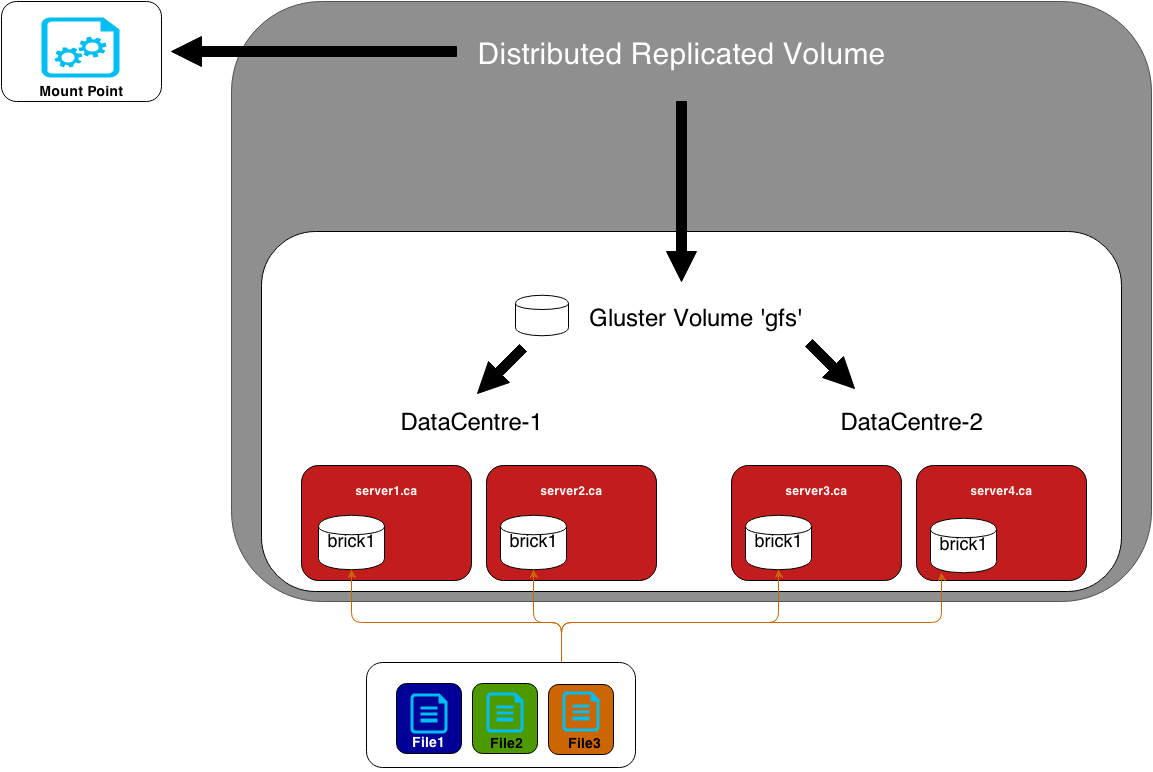
glusterfs>volume create repvol replica 2 172.16.0.5:/brick1 172.16.0.6:/brick2 force
glusterfs>volume start repvol
glusterfs>volume info
glusterfs>peer status
#####Client/Node#####
#yum install glusterfs-fuse
fstab:
172.16.0.12:/repvol-01 /data glusterfs _netdev 0 0
Boto3
#! Motivator .. I can do it..


Inspirational Quotes to Motivate You
- Nothing is impossible, the word itself says “I’m possible”! —Audrey Hepburn
- I’ve learned that people will forget what you said, people will forget what you did, but people will never forget how you made them feel. —Maya Angelou
- Whether you think you can or you think you can’t, you’re right. —Henry Ford
- Perfection is not attainable, but if we chase perfection we can catch excellence. —Vince Lombardi
- Life is 10% what happens to me and 90% of how I react to it. —Charles Swindoll
- If you look at what you have in life, you’ll always have more. If you look at what you don’t have in life, you’ll never have enough. —Oprah Winfrey
- Remember no one can make you feel inferior without your consent. —Eleanor Roosevelt
- I can’t change the direction of the wind, but I can adjust my sails to always reach my destination. —Jimmy Dean
- Believe you can and you’re halfway there. —Theodore Roosevelt
- To handle yourself, use your head; to handle others, use your heart. —Eleanor Roosevelt
- Too many of us are not living our dreams because we are living our fears. —Les Brown
- Do or do not. There is no try. —Yoda
- Whatever the mind of man can conceive and believe, it can achieve. —Napoleon Hill
- Twenty years from now you will be more disappointed by the things that you didn’t do than by the ones you did do, so throw off the bowlines, sail away from safe harbor, catch the trade winds in your sails. Explore, Dream, Discover. —Mark Twain
- I’ve missed more than 9000 shots in my career. I’ve lost almost 300 games. 26 times I’ve been trusted to take the game winning shot and missed. I’ve failed over and over and over again in my life. And that is why I succeed. —Michael Jordan
- Strive not to be a success, but rather to be of value. —Albert Einstein
- I am not a product of my circumstances. I am a product of my decisions. —Stephen Covey
- When everything seems to be going against you, remember that the airplane takes off against the wind, not with it. —Henry Ford
- The most common way people give up their power is by thinking they don’t have any. —Alice Walker
- The most difficult thing is the decision to act, the rest is merely tenacity. —Amelia Earhart
- It is during our darkest moments that we must focus to see the light. —Aristotle Onassis
- Don’t judge each day by the harvest you reap but by the seeds that you plant. —Robert Louis Stevenson
- The only way to do great work is to love what you do. —Steve Jobs
- Change your thoughts and you change your world. —Norman Vincent Peale
- The question isn’t who is going to let me; it’s who is going to stop me. —Ayn Rand
- If you hear a voice within you say “you cannot paint,” then by all means paint and that voice will be silenced. —Vincent Van Gogh
- Build your own dreams, or someone else will hire you to build theirs. —Farrah Gray
- Remember that not getting what you want is sometimes a wonderful stroke of luck. —Dalai Lama
- You can’t use up creativity. The more you use, the more you have. —Maya Angelou
- I have learned over the years that when one’s mind is made up, this diminishes fear. —Rosa Parks
- I would rather die of passion than of boredom. —Vincent van Gogh
- A truly rich man is one whose children run into his arms when his hands are empty. —Unknown
- A person who never made a mistake never tried anything new.——Albert Einstein
- What’s money? A man is a success if he gets up in the morning and goes to bed at night and in between does what he wants to do. —Bob Dylan
- I have been impressed with the urgency of doing. Knowing is not enough; we must apply. Being willing is not enough; we must do. —Leonardo da Vinci
- If you want to lift yourself up, lift up someone else. —Booker T. Washington
- Limitations live only in our minds. But if we use our imaginations, our possibilities become limitless. —Jamie Paolinetti
- If you’re offered a seat on a rocket ship, don’t ask what seat! Just get on. —Sheryl Sandberg
- Certain things catch your eye, but pursue only those that capture the heart. —Ancient Indian Proverb
- When one door of happiness closes, another opens, but often we look so long at the closed door that we do not see the one that has been opened for us. —Helen Keller
- Everything has beauty, but not everyone can see. —Confucius
- How wonderful it is that nobody need wait a single moment before starting to improve the world. —Anne Frank
- When I was 5 years old, my mother always told me that happiness was the key to life. When I went to school, they asked me what I wanted to be when I grew up. I wrote down “happy”. They told me I didn’t understand the assignment, and I told them they didn’t understand life. —John Lennon
- The only person you are destined to become is the person you decide to be. —Ralph Waldo Emerson
- We can’t help everyone, but everyone can help someone. —Ronald Reagan
- Everything you’ve ever wanted is on the other side of fear. —George Addair
- We can easily forgive a child who is afraid of the dark; the real tragedy of life is when men are afraid of the light. —Plato
- Nothing will work unless you do. —Maya Angelou
- I alone cannot change the world, but I can cast a stone across the water to create many ripples. —Mother Teresa
- What we achieve inwardly will change outer reality. —Plutarch


Protected: Youtube links:
Elastic BeanStalk:

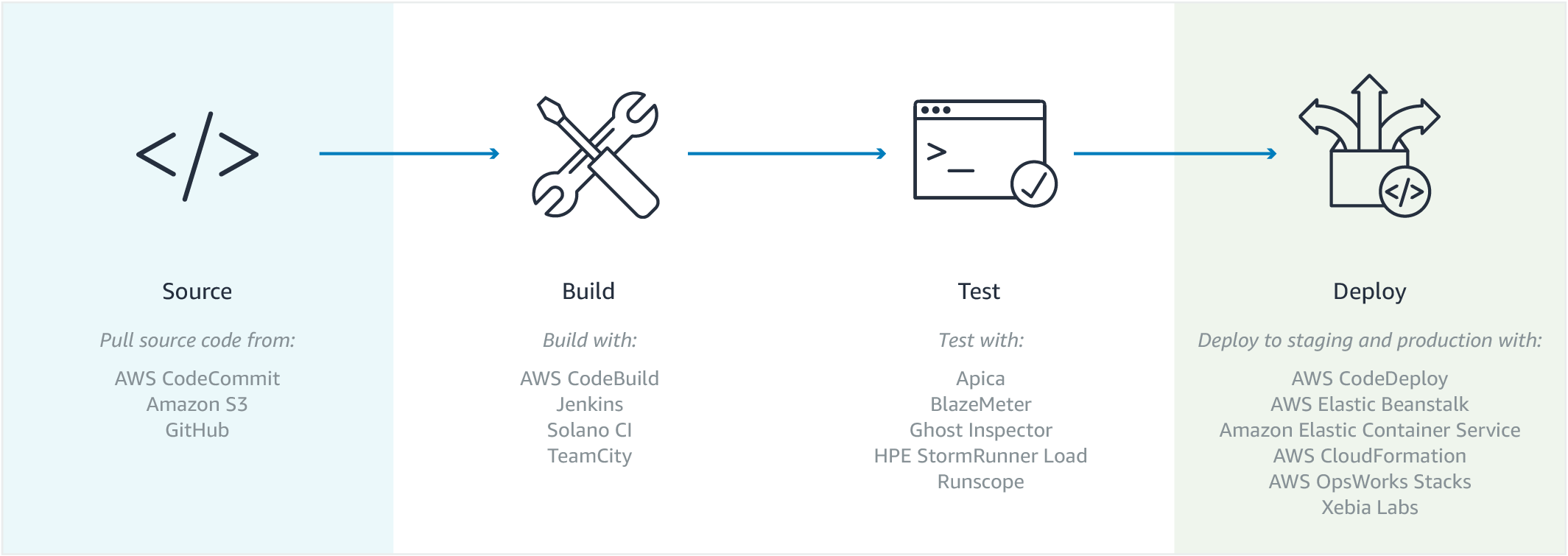


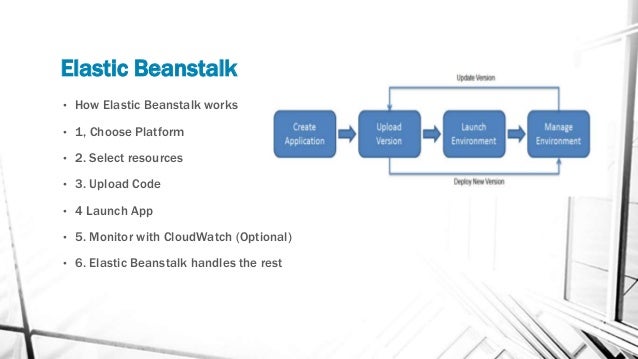
- PaaS by AWS
- Free of cost (Management ) – but charges only for the EC2 /ELB…
Benefits:
Sources: Google search
DevOps
Introduction to DevOps
- What is DevOps?
- History of DevOps
- Dev and Ops
- DevOps definitions
- DevOps and Software Development Life Cycle
- DevOps main objectives
- Infrastructure As A Code
- Prerequisites for DevOps
- Tools (Jenkins, Chef, Docker, Vagrant and so on.)
- Continuous Integration and Development
Linux Concepts
- Linux Installation
- User Management
- Package Management
- Networking
Automation Concepts
- OS Basics
- Scripting Introduction
- Learn Shell Scripting
- Database Concepts
- Shell Variable
- Shell Decision Making
- Shell Test Conditions
- Shell Loops
- Shell Redirectors
- Shell Exit status
Revision Controls System
- Subversion Controls/Git
- Working with local repositories
- Working with remote repositories
- branching
- merging
- cloning
- fetch/pull
- Installation of Git Server
Configuration Management
- Chef/Puppet/Ansible Introduction
- Chef server Hands-on
- Chef workstation setup
- Chef Distribution Kit
- Chef Concepts
Environments
- Attributes
- Resources
- Cookbook
- Run list
- Recipes
- Supermarket
Build Automation
- Introduction with Maven
- Maven structure
- Maven Phases
- Installation of Maven
- Configuration
- jar/war project structure
Tomcat Web Server
- Installation and Configuration
- Tomcat Manager
- Application Management
- App Deployment Methods
Nexus Artifacts/Proxy Tool
- Introduction to Nexus
- Installation and Configuration
- Repository Management
- Proxy Management
- Integration with Maven
Jenkins Framework
- Introduction to Jenkins
- Jenkins Installation
- User Profile
- User Management
- Security Management
- Plugins Management
- Builds Setup
- Integration with Git
- Integration with Maven
- Integration with Tomcat
- Integration with Maven
LAMP Setup
Apache/HTTPD Web Service
- Installation of Apache
- Configuration of Apache
- Static Pages
- Dynamic Pages
- PHP Integration
MySQL Database
- Working with Database
- Introduction to MySQL Database
- Configuration
- User management
- Permission management
- Creating Database
- Data insertion/update
- MySQL Data Backup
- MySQL Hands-on
- MySQL GUI Tools
Installation of WordPress with LAMP
- Vagrant
- Introduction to Vagrant
- Vagrant Terminologies
- Installation of Vagrant
- Vagrant Proxy Project
- Vagrant hands-on
Working with Docker
- Introduction to Docker
- Docker Terminologies
- Installation of Docker
- Docker image creation
- Docker hands-on
System Monitoring
- Introduction to Nagios
- Concepts behind Nagios
- Nagios Installation
DevOps:
DevOps is a set of practices that automates the processes between software development and IT teams, in order that they can build, test, and release software faster and more reliably. The concept of DevOps is founded on building a culture of collaboration between teams that historically functioned in relative siloes. The promised benefits include increased trust, faster software releases, ability to solve critical issues quickly, and better manage unplanned work.
At Atlassian, DevOps is the next most famous portmanteau (combining of two words) next to Brangelina (Brad Pitt and Angelina Jolie), bringing together the best of software development and IT operations. And like our jokes, it requires some explaining.
At its essence, DevOps is a culture, a movement, a philosophy.
It’s a firm handshake between development and operations that emphasizes a shift in mindset, better collaboration, and tighter integration. It unites agile, continuous delivery, automation, and much more, to help development and operations teams be more efficient, innovate faster, and deliver higher value to businesses and customers.
Source: https://www.atlassian.com/devops
DevOps Tool: http://www.nexiilabs.com/devops.html

